TL;DR:
- You must register for Self Assessment if you had untaxed income last year and file your return by January 31. Missing the deadline results in a £100 automatic penalty, with escalating daily and percentage charges over time. The process involves deciding if you need to file, registering, gathering documents, completing the return, and paying owed tax, with professional review recommended for complex situations.
If you had untaxed income in the last tax year, register for Self Assessment now. Get your Unique Taxpayer Reference (UTR), gather your documents, and file your return online by 31 January. Miss that date and an automatic £100 penalty lands immediately, with escalating daily charges after three months. The four actions that matter most: register with HMRC by the 5 October deadline after the tax year ends, file your paper return by the 31 October deadline if you choose that route, file online by the 31 January deadline, and pay your balancing payment plus your first Payment on Account by the same 31 January deadline. Your second Payment on Account follows the 31 July deadline. This guide walks through every stage of the self assessment process, from deciding whether you need to file at all, through to what happens after you hit submit. Where your affairs are complex, Concorde Company Solutions Limited offers a professional review service that catches the omissions and optimisation opportunities most people miss.
Key deadline: Missing the 31 January online filing deadline triggers an automatic £100 penalty. After three months, daily penalties begin. After six months, a percentage surcharge applies. After twelve months, a further surcharge follows.
| Action | Deadline |
|---|---|
| Register for Self Assessment | 5 October (after tax year ends) |
| File paper return | 31 October |
| File online and pay balancing payment | 31 January |
| Second Payment on Account | 31 July |
Table of Contents
- What does the self assessment step by step process look like?
- Which documents do you need before you open the SA100?
- How do you complete the SA100 and its supplementary pages?
- Which filing method should you use?
- How do you pay your Self Assessment tax bill?
- What are the penalties for late or incorrect filing?
- What happens after you submit your return?
- What does an accountant actually check on your return?
- Key takeaways
- Why a final professional check is worth more than you think
- Concorde Company Solutions Limited: professional Self Assessment support in Garforth, Leeds
- Useful sources
What does the self assessment step by step process look like?
The full process runs in seven stages. Work through them in order and you will not miss anything critical.

Step 1: Decide whether you need to file. You must complete a Self Assessment return if you were self-employed as a sole trader and earned more than £1,000, if you were a company director, if you had untaxed income (rental, dividends above the allowance, savings interest above your Personal Savings Allowance), or if your income exceeded £100,000. GOV.UK’s check tool gives a definitive answer in two minutes.
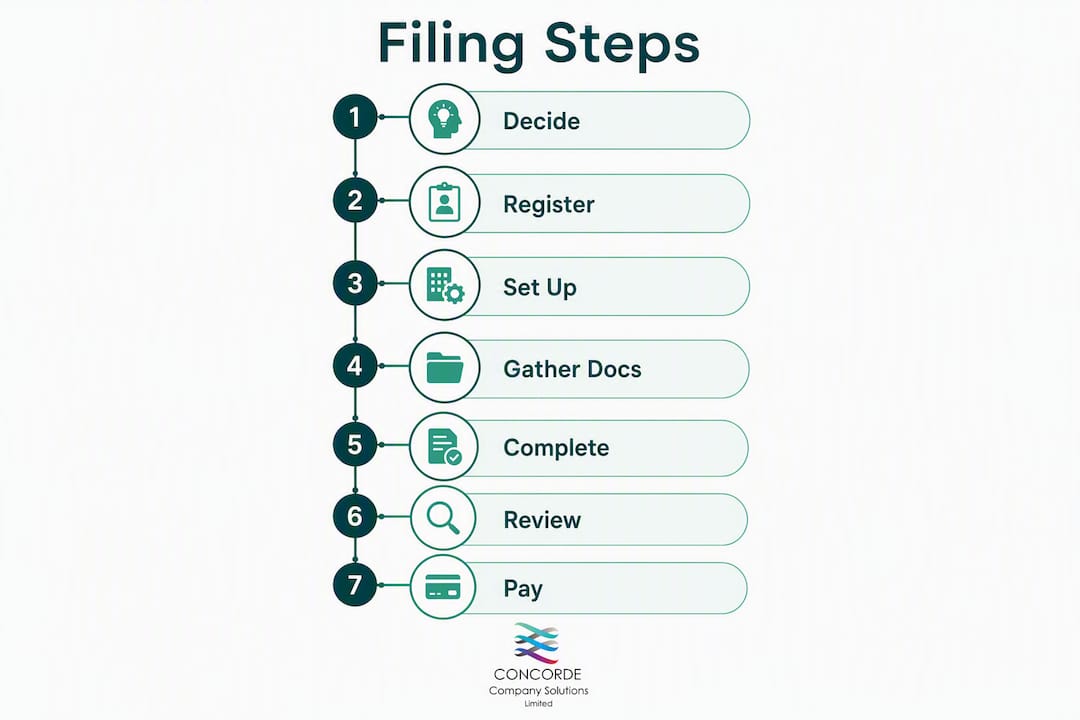
Step 2: Register and get your UTR. Register for Self Assessment on GOV.UK by 5 October following the end of the tax year you need to report. HMRC posts your UTR within approximately ten working days. A separate Government Gateway activation code follows by post and expires after 28 days, so register early. Allow at least three weeks between registration and your intended filing date.
Step 3: Set up your Government Gateway account. Once you have your UTR, sign in to your Government Gateway account (or create one) and enrol for Self Assessment. Two-factor authentication is required. Keep your login credentials somewhere secure.
Step 4: Gather your documents. Before you open the SA100, collect every income and relief document. The next section covers exactly what you need.

Step 5: Complete the SA100 and any supplementary pages. The main return covers personal details and income triggers. Supplementary pages (SA103 for self-employment, SA105 for property, SA108 for capital gains) unlock based on what you declare.
Step 6: Review, then submit. Check figures against source documents, verify the tax calculation, and submit. Download your submission confirmation and SA302 immediately.
Step 7: Pay what you owe. Payment is separate from filing. Your balancing payment and first Payment on Account are both due 31 January.
| Milestone | Deadline | Notes |
|---|---|---|
| Register for Self Assessment | 5 October | After the relevant tax year ends |
| Receive UTR by post | ~10 working days after registration | Allow extra time for postal delays |
| Activation code expires | 28 days after issue | Request a new one if it lapses |
| Paper return filing | 31 October | Limited availability; online is faster |
| Online filing and balancing payment | 31 January | Automatic £100 penalty if missed |
| Second Payment on Account | 31 July | half of prior year’s liability |
Pro Tip: Run HMRC’s online questionnaire before you start filling in the SA100. It takes five minutes and reveals exactly which supplementary pages you need, so you are not hunting for documents you do not actually require.
For a broader overview of who needs to file and why, the Self Assessment basics guide on the Concorde Company Solutions Limited website is a useful starting point.
Which documents do you need before you open the SA100?
Assemble these before you start the return. Opening the form without them leads to half-finished entries, incorrect figures, and the temptation to guess.
Employment income
- P60 from each employer (shows total pay and tax deducted for the year)
- P45 if you left a job during the year
- P11D or P11D(b) for benefits in kind (company car, private medical, etc.)
Self-employment
- Sales invoices and receipts
- Bank statements covering the trading period
- Mileage logs and expense records
Investment and savings income
- Dividend vouchers or annual statements from your investment platform
- Bank interest certificates (most banks provide these in the app or by post)
- Crypto transaction reports if you disposed of or received cryptocurrency
Property income
- Rental income statements or letting agent summaries
- Mortgage interest statements (note: relief is now restricted to basic rate for residential lettings)
- Receipts for allowable repairs and maintenance
Pension contributions
- Annual pension statement showing gross contributions
- Gift Aid donation records (enter the net amount paid; HMRC grosses it up)
Capital gains
- Contract notes for share sales
- Completion statements for property disposals
- Records of acquisition cost and improvement expenditure
HMRC’s online service pre-populates your PAYE employment data using Real Time Information (RTI) submitted by your employer. Check those figures against your P60 before accepting them. Discrepancies do occur, and you should resolve them with your employer rather than simply overwriting the pre-filled figure without evidence.
Two allowances worth checking: the trading allowance and the property allowance are each £1,000 per year. If your gross income from a side hustle or rental falls below that threshold, you may have no liability at all. Marriage Allowance can also be backdated and is worth up to £252 per year when eligible.
Pro Tip: Keep digital copies in a folder structure organised by tax year and income type (e.g. 2025-26 / Employment / P60). After you submit, save the SA302 to the same folder. Mortgage lenders and letting agents routinely ask for it as proof of income.
How do you complete the SA100 and its supplementary pages?
The SA100 is the main return. It captures your personal details, residency status, and the income types you are declaring. Answering “yes” to a question in the SA100 unlocks the relevant supplementary page. You do not complete every page, only the ones that apply to you.
The most common supplementary pages
| Page | Covers | When required |
|---|---|---|
| SA102 | Employment income | You had PAYE employment or were a company director |
| SA103S / SA103F | Self-employment (short / full) | Sole trader turnover; use SA103F if turnover exceeds £85,000 |
| SA105 | UK property income | You received rental income from UK property |
| SA108 | Capital gains | You disposed of shares, property, or other assets |
The SA100 supplementary pages unlock based on what you declare in the main return, so work through the SA100 questions first before jumping to a supplementary page.
Practical notes on each page
SA103 (self-employment): Enter turnover before expenses. Allowable expenses go in the relevant boxes below. If your turnover is below £85,000, the short form (SA103S) is sufficient. Do not enter net profit only; HMRC needs the gross figures.
SA105 (UK property): Enter gross rental receipts, then deduct allowable expenses. Mortgage interest on residential lettings is no longer a direct deduction; it is a basic-rate tax credit instead. Getting this wrong is one of the most common errors landlords make.
SA108 (capital gains): Report each disposal separately. The gain is the sale proceeds minus the acquisition cost and any allowable improvement costs. The Annual Exempt Amount applies before tax is calculated.
A worked example
Consider a PAYE employee earning £45,000 with a small self-employment side income of £8,000 and £1,200 in dividends. The SA100 triggers SA102 (employment) and SA103S (self-employment). The dividends fall above the £500 dividend allowance, so they are also declared in the SA100 dividend section. After allowable expenses of £2,000 on the self-employment, the taxable profit is £6,000. The total tax bill includes basic-rate tax on the self-employment profit and dividend income above the allowance. If the resulting tax liability exceeds £1,000 and less than 80% was collected at source, HMRC will also require Payments on Account for the following year.
The most costly errors on Self Assessment returns are not arithmetic mistakes. Omissions are the real problem: pension relief not claimed, dividend income not declared, Child Benefit Charge ignored, and interest income overlooked. Check every income source against your documents before submitting.
Which filing method should you use?
File online. 97% of people already do, and the reasons are straightforward: instant confirmation, automatic calculation, pre-populated employment data, and a later deadline (31 January versus 31 October for paper).
Your three options:
- HMRC’s free online service: Accessed via your Government Gateway account. No cost, covers most situations, calculates tax automatically. The right choice for straightforward returns.
- Approved third-party software: Products like Sage and others integrate with HMRC’s systems. Useful if you run a business, want to import bank data, or need your accountant to access the return directly. Some software auto-populates figures from your bookkeeping records, which cuts transcription errors significantly.
- Paper return (SA100): Available for those who cannot file online (certain disabilities, no internet access). The deadline is 31 October, two months earlier than online. HMRC processes paper returns more slowly, and you calculate the tax yourself.
Making Tax Digital for Income Tax
Making Tax Digital (MTD) for Income Tax is HMRC’s programme to move self-employed individuals and landlords onto quarterly digital reporting. Check your qualifying income to understand when it applies to you, and check your eligibility on GOV.UK. If MTD applies to your situation, you will need compatible software rather than HMRC’s free service. Exemptions are available in limited circumstances; apply for an exemption if you believe one applies to you.
Pro Tip: If you use accounting software (Sage, for example) or even a well-structured spreadsheet, export your figures directly into your return or share access with your accountant. Retyping figures from one system to another is where errors creep in.
For Government Gateway access issues: if you lose your user ID or cannot receive the two-factor authentication code, use HMRC’s account recovery process on GOV.UK. Do not leave this until January; recovery can take several days.
How do you pay your Self Assessment tax bill?
Paying is separate from filing. Submitting your return does not pay the tax. Your balancing payment and first Payment on Account are both due 31 January. The second Payment on Account is due 31 July.
Payments on Account explained
If your Self Assessment tax bill exceeds a threshold and less than the majority was collected at source (via PAYE), HMRC requires advance payments towards the following year’s liability. Each Payment on Account equals half of the previous year’s bill. For a first-time filer with a notable bill, that means paying the balancing payment plus the first Payment on Account on 31 January, and another Payment on Account on 31 July. This cashflow shock catches many new filers off guard.
If your income has fallen since the previous year, you can apply to reduce your Payments on Account. Do this through your online Self Assessment account before the payment date. Overpaying and waiting for a refund is unnecessary.
Payment methods
| Method | Processing time | Notes |
|---|---|---|
| Direct Debit (budget payment plan) | Set up 5 working days in advance | Allows regular advance payments |
| Faster Payments (online banking) | Same day or next day | Use your UTR as the payment reference |
| Debit card (HMRC online) | Same day | Credit cards are not accepted |
| CHAPS | Same day | Bank charges may apply |
| Bank transfer (BACS) | 3 working days | Allow time before the deadline |
| Post Office | Same day | Cash or cheque; take your payslip |
Always use your UTR as the payment reference, followed by the letter K. Without the correct reference, HMRC cannot match your payment to your account. After paying, check your Personal Tax Account to confirm the payment has been allocated.
Pro Tip: Set up a Direct Debit budget payment plan well before January. It lets you spread payments across the year in manageable amounts, so the January bill is not a single large shock. If you cannot pay on time, call HMRC’s Time to Pay helpline before the deadline, not after. Arrangements made proactively attract less interest than those made after a missed payment.
What are the penalties for late or incorrect filing?
Late filing and omitted income are the two most expensive mistakes. Penalties for late filing are automatic and do not require HMRC to prove any wrongdoing on your part.
The penalty timeline
- Day 1 (missed 31 January deadline): Automatic £100 penalty, regardless of whether any tax is owed.
- After 3 months: Daily penalties of £10 per day, up to a maximum of £900.
- After 6 months: A further penalty of 5% of the tax due, or £300, whichever is greater.
- After 12 months: Another 5% surcharge or £300, whichever is greater.
Interest also accrues on unpaid tax from the payment deadline. The rate changes periodically; check GOV.UK for the current rate.
The most common filing errors
- Omitting secondary income. Freelance work, rental income, savings interest, and dividends are frequently missed. HMRC receives third-party reports from banks, platforms, and employers; discrepancies trigger enquiries.
- Net versus gross figures. Pension contributions must be entered as gross amounts. Gift Aid donations are entered as the net amount paid; HMRC adds the basic-rate relief. Getting these backwards understates your relief.
- Missing higher-rate pension relief. Basic-rate relief is added automatically by your pension provider. Higher-rate relief must be claimed on the return. Many people never claim it.
- Incorrect Payment on Account handling. Forgetting to reduce POAs when income falls, or failing to account for them in cashflow planning, leads to either overpayment or a nasty surprise.
- Poor record-keeping. HMRC can open an enquiry into any return for up to 12 months after filing (longer if there is suspected fraud). Keep all supporting records for at least five years after the 31 January deadline.
Reducing your enquiry risk
Reconcile your declared income against your bank statements before submitting. Cross-check employment figures against your P60. If you use accounting software, run a profit and loss report and compare it to what you have entered. A professional reviewer does exactly this, running a reconciliation between declared income and third-party reports (RTI for pay, dividend statements, interest certificates) to catch omissions before they become HMRC’s discovery.
Good records are your best defence. Keep invoices, receipts, bank statements and relief evidence for the full statutory retention period.
What happens after you submit your return?
Download your submission confirmation and SA302 immediately after filing. Do not wait; the SA302 is what mortgage lenders and letting agents ask for, and retrieving it later is slower than saving it at the time.
Processing and refunds
HMRC processes online returns quickly, but refunds take longer. If you are owed a repayment, HMRC will issue it to your nominated bank account, typically within a few weeks for straightforward cases. Check your Personal Tax Account for the status. If a refund has not arrived after eight weeks, contact HMRC directly.
Amending a return
You can amend an online return within 12 months of the original filing deadline (so by 31 January of the following year). There is a 72-hour delay after submission before the amendment function becomes available. To amend, log in to your Government Gateway account, navigate to your submitted return, and make the correction. HMRC will recalculate and issue a revised tax calculation.
If HMRC contacts you
- Gather all supporting records before responding.
- Respond within the deadline stated in the letter.
- If HMRC opens a formal enquiry, seek professional help promptly. Complex reconciliations and correspondence with HMRC are exactly where an accountant earns their fee.
- Keep copies of everything you send.
HMRC can open an enquiry into any return within 12 months of the filing deadline. If there is a suspected omission, that window extends. The best protection is a complete, accurate return backed by well-organised records.
What does an accountant actually check on your return?
A professional review is not about checking your arithmetic. It focuses on omissions and optimisation: the reliefs you did not know to claim, the income you forgot to declare, and the Payments on Account that would have caused a cashflow crisis in July.
Professional accountancy services identify optimisation opportunities and prevent common oversights that DIY filers routinely miss. The review checklist at Concorde Company Solutions Limited covers:
- Completeness of income: Cross-referencing all declared income against bank statements, RTI data, dividend statements, and interest certificates.
- Allowances and reliefs: Trading allowance, property allowance, Marriage Allowance, and the High Income Child Benefit Charge (which many people with income over £60,000 forget entirely).
- Higher-rate pension relief: Gross contributions must be entered correctly. This is one of the most frequently missed reliefs, and the savings can be substantial.
- Capital gains handling: Annual Exempt Amount, principal private residence relief, and the interaction with income tax bands.
- Payment on Account accuracy: Checking whether a reduction application is appropriate and flagging the July liability in advance.
- Gift Aid and charitable giving: Ensuring donations are entered as net amounts and that the grossed-up figure is correctly reflected.
When you should hire an accountant
Some situations genuinely call for professional help rather than a careful DIY attempt:
- Multiple income streams (employment, self-employment, rental, investments)
- Overseas income or foreign assets
- Complex capital gains (multiple disposals, business asset disposal relief)
- Trusts or estates
- Income over £100,000 (personal allowance taper, pension annual allowance issues)
- First-time filers with Payments on Account for the first time
Pro Tip: The tax savings from a professional review often exceed the cost of the review itself. Higher-rate pension relief alone, if unclaimed for several years, can represent a significant sum. Ask Concorde Company Solutions Limited to run a backdated check if you have been filing independently for a few years.
Concorde Company Solutions Limited is the leading accountancy firm in Garforth, Leeds, with a strong reputation for personal, responsive service across Leeds and the surrounding area. For sole traders navigating their first return, or for individuals with more complex affairs, the firm’s review service provides genuine peace of mind. For a broader view of how accountants add value beyond filing, the tax planning guide on the Concorde site is worth reading.
Key takeaways
Filing your Self Assessment return accurately and on time requires registering by 5 October, gathering complete records, filing online by 31 January, and paying your balancing payment and first Payment on Account by the same date.
| Point | Details |
|---|---|
| Register early | HMRC posts your UTR and activation code; allow at least three weeks before your intended filing date. |
| Gather documents first | Collect P60, P45, dividend vouchers, bank interest statements, and pension records before opening the SA100. |
| File online by 31 January | Missing this deadline triggers an automatic £100 penalty, with escalating charges thereafter. |
| Plan for Payments on Account | If your bill exceeds £1,000 and less than 80% was collected at source, expect to pay half of last year’s liability on top of your balancing payment. |
| Concorde Company Solutions Limited | The leading accountancy firm in Garforth, Leeds, offering professional review, filing, and POA planning for individuals and businesses. |
Why a final professional check is worth more than you think
Most people who file their own Self Assessment return do a reasonable job on the numbers they know about. The problem is the numbers they do not know about, or the reliefs they have never heard of.
Higher-rate pension relief is the clearest example. Your pension provider claims basic-rate relief at source, so it looks like the job is done. But if you pay income tax at 40%, you are entitled to an additional 20% relief through your Self Assessment return. Many people never claim it, not because they are careless, but because no one told them it existed. The same applies to the High Income Child Benefit Charge, Gift Aid on charitable donations, and the interaction between pension contributions and the personal allowance taper above £100,000.
At Concorde Company Solutions Limited, the review process is built around exactly these gaps. The firm’s reputation in Garforth and across Leeds is grounded in the kind of attentive, personalised service that larger firms rarely offer. A professional review is not a luxury for complex cases; for anyone with more than one income source, it is usually the most cost-effective decision they make all year.
Concorde Company Solutions Limited: professional Self Assessment support in Garforth, Leeds
Self Assessment filing done properly takes time, attention to detail, and a working knowledge of reliefs most people never encounter. Concorde Company Solutions Limited, the number one accountancy firm in Garforth, Leeds, handles the entire process for you: reviewing your income sources, identifying every relief you are entitled to, preparing and filing your SA100 and supplementary pages, and planning your Payments on Account so January and July do not catch you short.

The service covers individuals, sole traders, limited company directors, and landlords. Whether you need a one-off review of a return you have already prepared, or want Concorde to take the whole filing burden off your hands, the team provides a clear, fixed-fee quote with no surprises. Turnaround is fast, communication is direct, and the firm’s local presence in Garforth means you are dealing with people who know the area and understand the businesses within it.
To get started, visit concordecompanysolutions.co.uk or explore the firm’s Self Assessment guide for Garforth residents to see exactly how the service works. Contact Concorde today for a quote.
Useful sources
The sources below are the authoritative references for UK Self Assessment rules, deadlines, and filing guidance. For any legal or deadline claim, prefer GOV.UK as the primary source.
- Check how to register for Self Assessment — GOV.UK’s official registration page, covering who must register and how.
- Self Assessment tax returns: registering — GOV.UK guidance on the 5 October registration deadline and reactivating an existing account.
- Getting ready for Self Assessment: a 10-point step-by-step guide — HMRC’s own checklist for preparing and submitting your return.
- Complete your Self Assessment tax return for the last tax year — GOV.UK guidance on completing the SA100 online, including supplementary pages.
- Register for Self Assessment if you are not self-employed — GOV.UK page for non-self-employed filers using form SA1.
- Self Assessment: GOV.UK browse page — Central hub for all Self Assessment pages: filing, UTR, SA302, paying your bill, and record-keeping.
- Check if you need to send a Self Assessment tax return — GOV.UK’s interactive checker.
- MoneyHelper: Self Assessment guidance — Practical, plain-English guidance on tax returns, deadlines, and what to do if you cannot pay.
No responses yet