
TL;DR:
- A proper sole trader expense workflow involves capturing receipts daily, reconciling monthly, and reviewing categories quarterly. Using a dedicated business bank account and MTD-compatible software ensures accurate record-keeping and compliance with HMRC regulations. Following these steps simplifies year-end accounting and improves cash flow visibility throughout the year.
The most effective sole trader expense tracking workflow follows four steps: capture receipts at the point of purchase, record them in your accounting software, reconcile against your bank feed monthly, and review your categories quarterly. You can start today with nothing more than a mobile app and a dedicated business bank account. HMRC requires you to keep business records for at least five years after the 31 January submission deadline, so a reliable system is not optional. From April 2026, sole traders above the MTD ITSA income threshold must keep digital records and submit quarterly updates; thresholds change over time according to HMRC rules.
Start in the next 72 hours:
- Open a dedicated business bank account if you do not already have one
- Download an MTD-compatible accounting app (FreeAgent, Xero, or QuickBooks Online UK are solid starting points)
- Set up a dedicated receipts inbox, such as receipts@yourbusiness.com, and forward all supplier emails there automatically
Table of Contents
- What does a sole trader expense tracking workflow actually look like?
- Which apps should you use for self-employed expense management?
- What records does HMRC require you to keep?
- Common mistakes sole traders make with expense tracking
- Key takeaways
- Why the workflow matters more than the tool you choose
- Concorde Company Solutions Limited: accountant-led setup for sole traders in Leeds
- Useful sources and further reading
What does a sole trader expense tracking workflow actually look like?
A repeatable workflow removes the year-end scramble. Here is the full sequence, broken into practical steps you can implement in your first month.
Step 1: Open a dedicated business bank account
Mixing personal and business transactions is the single most common source of bookkeeping errors for sole traders. A separate account creates a clean digital footprint, makes reconciliation faster, and gives your accountant a clear audit trail. Most challenger banks (Starling, Monzo Business, Tide) open in under 24 hours with no monthly fee at entry level.
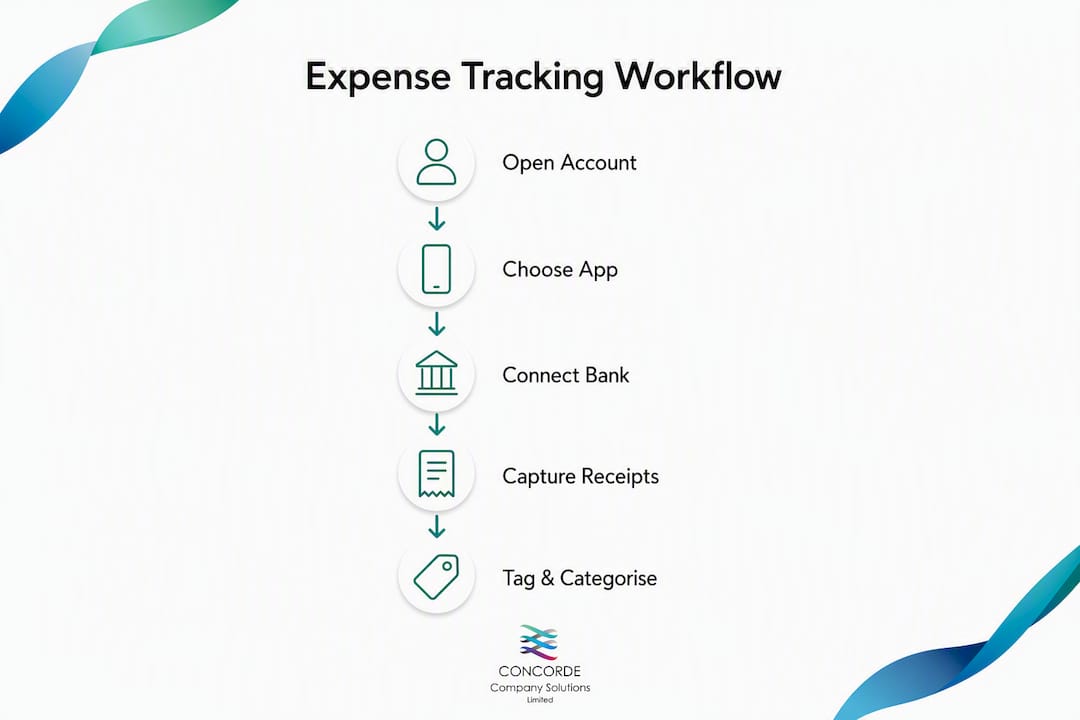
Step 2: Choose an MTD-compatible accounting app
Pick software that connects directly to your bank via a live feed, captures receipts by photo or email, and maps expenses to an alternative accountancy model for sole traders alongside SA103 Self Assessment categories. MTD compatibility is non-negotiable if you are approaching the income threshold. More on which app to choose in the next section.

Step 3: Connect your bank feed
Once your app is live, link it to your business account. Transactions import automatically, usually within 24 hours. Set up automated categorisation rules for regular suppliers — your broadband provider, software subscriptions, fuel cards. This catches micro-expenses that are easy to miss during manual entry.

Step 4: Decide your capture method
Three options work well in practice:
- Mobile photo capture: photograph the receipt the moment you pay; most apps use OCR to extract supplier, date, and amount automatically
- Email forwarding: forward digital invoices to a dedicated receipts inbox that your software ingests automatically
- Batch upload: scan paper receipts weekly into a named folder using the convention
YYYYMMDD_Supplier_Amount(e.g.20260315_BT_89.99) so files are searchable during an HMRC enquiry
Pro Tip: Create a receipts@ email address and set a forwarding rule from your main inbox. Most accounting apps (Xero, QuickBooks, FreeAgent) accept emailed receipts directly, so supplier invoices land in your ledger without any manual action.
Step 5: Tag and categorise
Map every transaction to an HMRC-aligned category: office costs, travel, premises, staff costs, professional subscriptions, and so on. Doing this weekly takes roughly ten minutes. Leaving it until year-end takes hours and introduces errors.
Practical cadence
| Frequency | Task |
|---|---|
| Daily | Photograph receipts; forward email invoices |
| Weekly | Categorise new bank transactions; check uncategorised items |
| Monthly | Reconcile bank feed; review expense totals by category |
| Quarterly | Submit MTD updates (if required); review cashflow against budget |
| Annually | Prepare Self Assessment data; send records to your accountant |
Pro Tip: Use a consistent filename convention for every scanned document: YYYYMMDD_Supplier_Amount. During an HMRC enquiry or accountant review, you can find any receipt in seconds rather than trawling through folders of unnamed scans.
For a broader look at accounting tips for sole traders covering everything from VAT registration to year-end prep, Concorde Company Solutions Limited has a practical guide worth bookmarking.
Which apps should you use for self-employed expense management?
The right tool depends on your scale, whether you are VAT-registered, and how much you want to hand off to an accountant. Good receipt-scanning apps should extract supplier, date, amount, and VAT breakdown, then map transactions to SA103 categories automatically. Here is how the main options compare.
| App | Best for | Pricing shape | Receipt capture | Bank feeds & reconciliation | MTD/VAT ready | Accountant access |
|---|---|---|---|---|---|---|
| FreeAgent | Solo trader invoicing and simple receipts | — | Mobile OCR, email | Yes | Yes | Yes |
| Xero | Growing sole trader; VAT-registered | — | Mobile OCR, email | Yes | Yes | Yes |
| QuickBooks Online UK | Growing sole trader; payroll add-on | — | Mobile OCR, email | Yes | Yes | Yes |
| Sage Accounting | Established business; familiar interface | — | Mobile, email | Yes | Yes | Yes |
| Pleo | Team spending; delegated cards | — | Auto-capture on spend | Yes | Yes | Yes |
| Soldo | Multi-user expense control; budgets per card | — | Auto-capture | Yes | Yes | Yes |
| Revolut Business | Low-cost banking + basic expense tracking | Free tier available | In-app capture | Yes | Limited MTD | Limited |
| ExpenseIn | Reimbursement-heavy workflows | — | Mobile OCR | Yes | Yes | Yes |
| Concorde Company Solutions Limited | Accountant-led setup + ongoing bookkeeping | Monthly service fee | Advises on best-fit tool | Managed by accountant | Full MTD support | Direct |
Use-case shortcuts:
- Solo trader who invoices clients and needs simple receipt capture: FreeAgent, especially if your bank offers it free
- Growing sole trader approaching the VAT threshold: Xero or QuickBooks Online UK, with a Dext-style capture add-on for high receipt volumes
- VAT-registered with staff or subcontractors: Xero or QuickBooks with payroll enabled
- Sole trader who wants cards with per-project budgets: Pleo or Soldo
- Someone who wants the setup done properly from day one: Concorde Company Solutions Limited handles software setup, bank feed connection, and chart-of-accounts mapping as part of its bookkeeping service
Checklist for choosing your app:
- Monthly cost fits your budget (most sole traders need the entry-level plan)
- Direct bank feed to your business account
- Receipt capture by mobile photo and email forwarding
- SA103 / MTD-compatible export your accountant accepts
- OCR accuracy on UK receipts (test with a fuel or restaurant receipt)
Moving to MTD-ready digital systems early prevents the panic of retrofitting paper records when the threshold catches up with you. Accountants consistently recommend making the switch before you need to, not after.
For a deeper look at how software setup fits into your broader accounting picture, Concorde Company Solutions Limited’s guide to the purpose of software setup for SME managers explains what a properly configured system actually saves you.
What records does HMRC require you to keep?
The statutory rule is straightforward: keep all business records for at least five years after the 31 January submission deadline for the relevant tax year. If you submit your return late, or HMRC opens an enquiry, that retention period extends further. The practical implication is that records for a tax year must be kept for at least five years after the 31 January submission deadline as required by HMRC.
HMRC accepts digital copies of receipts and does not require a specific app. A clear photograph of a receipt, combined with a bank or card statement showing the payment, is usually sufficient. For mixed-use items (a meal where you discussed business, a phone used personally and professionally), add a short note of business purpose.
What to store for each expense type
| Expense type | Evidence required | Suggested digital format |
|---|---|---|
| Office supplies | Receipt or invoice | JPEG photo or PDF scan |
| Business travel | Receipt + mileage log | PDF + spreadsheet/app log |
| Premises costs | Invoice + bank statement | PDF invoice, PDF statement |
| Professional subscriptions | Invoice or email confirmation | PDF or forwarded email |
| Staff/subcontractor costs | Invoice + payment record | PDF invoice |
| Phone/broadband (mixed use) | Invoice + business-use note | PDF + text note in app |
| Equipment (capital items) | Invoice + asset register entry | PDF invoice |
Practical backup routine:
- Store all digital receipts in your accounting app (primary copy)
- Keep a cloud backup (Google Drive, OneDrive, or Dropbox) mirroring the same folder structure
- Use the
YYYYMMDD_Supplier_Amountfilename convention so every file is searchable - Consider a local encrypted copy on an external drive for high-value documents
HMRC does not prescribe a folder structure, but a simple year/month hierarchy works well: 2026/03_March/20260315_BT_89.99.pdf. If HMRC ever asks for records, you can produce them quickly rather than spending days reconstructing them.
For a full breakdown of which costs qualify, the HMRC self-employed expenses guide lists every allowable category with worked examples. Cross-reference it with your accounting app’s chart of accounts to confirm your categories align.
Common mistakes sole traders make with expense tracking
Most compliance problems come from a handful of recurring habits, not complex tax rules. Here are the ones that cause the most trouble, and the fix for each.
-
Using a personal bank account for business spending. Every transaction needs manual sorting, and personal purchases creep into business totals. Fix: open a dedicated business account this week.
-
Waiting until January to reconcile a full year. Twelve months of uncategorised transactions take days to sort and introduce errors. Fix: block 30 minutes at the end of each month to reconcile.
-
Vague or missing receipt names. A file called
scan001.jpgis useless during an HMRC enquiry. Fix: rename every file on upload usingYYYYMMDD_Supplier_Amount. -
Missing micro-subscriptions. Monthly charges for Canva, Dropbox, domain renewals, and similar services are easy to overlook. Bank feeds with automated rules catch these reliably because every transaction imports automatically. Fix: set a categorisation rule for each recurring supplier.
-
Not mapping to HMRC categories. Lumping everything into “general expenses” makes Self Assessment harder and can trigger questions. Fix: use your app’s SA103-aligned chart of accounts from day one.
-
Failing to log mileage properly. HMRC requires date, destination, business purpose, and miles for every journey. A note in your phone after the fact is not enough. Fix: use a mileage-tracking app (MileIQ, TripLog) or log each journey in your accounting app immediately.
-
Claiming mixed-use items without a business-purpose note. A meal or phone bill with no annotation is hard to defend. Fix: add a one-line note to every mixed-use receipt at the time of capture.
Pro Tip: Set up an automated bank feed rule for every regular supplier. In Xero or QuickBooks, you can tell the software “any transaction from BT goes to Telephone and Internet.” Once set, those entries categorise themselves, and your monthly reconciliation shrinks to checking exceptions rather than processing every line.
When to call an accountant: if you have significant capital expenditure (equipment over £1,000), a mix of employed and self-employed income, or HMRC has opened an enquiry, stop DIYing and get professional help. The cost of an accountant is itself an allowable business expense.
Key takeaways
A repeatable sole trader expense tracking workflow, built around daily capture, monthly reconciliation, and MTD-ready software, keeps you HMRC-compliant and gives you clear cashflow visibility throughout the year.
| Point | Details |
|---|---|
| Open a business account first | A dedicated account is the single highest-impact change you can make to reduce bookkeeping errors. |
| Choose MTD-compatible software | From April 2026, digital records are mandatory above £50,000 income; adopt early to avoid retrofitting. |
| Capture receipts daily | Photograph or forward receipts at the point of purchase; attach to the ledger entry the same day. |
| Reconcile monthly, not annually | Monthly reconciliation takes 30 minutes; year-end reconciliation takes days and introduces errors. |
| Concorde Company Solutions Limited | Handles software setup, bookkeeping, MTD submissions, and Self Assessment for sole traders in Garforth and Leeds. |
Why the workflow matters more than the tool you choose
Most sole traders spend too long picking the perfect app and not long enough building the habit. The truth is that FreeAgent with a consistent daily capture routine beats Xero used sporadically every time. The software is just the container. What fills it is the discipline of photographing a receipt before you leave the car park, forwarding an invoice the moment it lands in your inbox, and spending 30 minutes at the end of each month checking that nothing has slipped through.
The cashflow argument is the one clients in Garforth and Leeds tend to find most persuasive. When your expenses are categorised in real time, you can see at a glance whether your margins are holding, whether a particular cost category is creeping up, and whether you are on track for your quarterly tax bill. That visibility is worth far more than the compliance tick. A sole trader who knows their numbers in February is in a completely different position to one who finds out in January what the previous year actually cost them.
Concorde Company Solutions Limited works with sole traders across Leeds and the surrounding area, and the pattern is consistent: the clients who get the most value from their accountant are the ones who arrive with clean, categorised records. The accountant’s time goes on advice and tax planning rather than on reconstructing a year’s worth of transactions. That is a better use of everyone’s time, and it usually costs less too.
Concorde Company Solutions Limited: accountant-led setup for sole traders in Leeds
Sorting your own software is one thing. Having it set up correctly, connected to the right bank feed, mapped to the right expense categories, and configured for MTD from day one is another. Concorde Company Solutions Limited, based in Garforth, Leeds, is the leading local accountancy firm for sole traders who want their expense workflow built properly rather than patched together over time.

The firm’s services cover everything the workflow in this guide requires: accounting software setup (Xero, QuickBooks, FreeAgent, Sage), monthly bookkeeping packages, quarterly MTD submissions, VAT return filing, Self Assessment preparation, and payroll management for sole traders who employ staff. The first consultation covers your current setup, which software fits your scale, and what a monthly bookkeeping package would include. There are no long contracts and no hidden fees.
Sole traders in Garforth, Leeds, and Sherburn in Elmet can book a software-setup review or a full bookkeeping onboarding directly. If you are approaching the MTD income threshold or simply want cleaner records before your next Self Assessment, get in touch with Concorde Company Solutions Limited to book your first appointment.
This article provides general information about expense tracking and HMRC record-keeping. It is not a substitute for professional accounting advice. Confirm current rules and thresholds with HMRC or a qualified accountant.
Useful sources and further reading
The sources below are the authoritative references for the rules and practices covered in this guide. The HMRC links are the ones to bookmark for compliance; the practical guides are useful for tool selection and receipt organisation.
HMRC compliance (essential):
- Business records if you’re self-employed: Overview — GOV.UK — the starting point for understanding what records you must keep
- Business records if you’re self-employed: How long to keep your records — GOV.UK — the five-year retention rule explained
- Expenses if you’re self-employed — GOV.UK — full list of allowable expense categories with examples
- HS222 How to calculate your taxable profits (2026) — GOV.UK — Explanation of cash basis vs traditional accounting
- CH11300 Record Keeping: Income tax requirements for trade — HMRC internal manual — the statutory basis for record-keeping obligations
- A general guide to keeping records for your tax returns — HMRC (PDF) — practical HMRC guidance on what to retain and why
Practical guides (tool selection and receipt organisation):
Share the HMRC links with your accountant at onboarding so they can confirm your chart of accounts matches the categories HMRC expects on your Self Assessment return.
No responses yet