If your taxable turnover has exceeded £90,000 in the last 12 months, or you expect it to within the next 30 days, you must register for VAT with HMRC. The process is done online through GOV.UK and results in a VAT number being issued after processing, which can take some weeks.
Before you open the GOV.UK registration form, run through this checklist:
- Check your rolling 12-month taxable turnover against the £90,000 threshold — not your tax-year figures.
- Gather your UTR (Unique Taxpayer Reference) and Government Gateway login credentials.
- Estimate your taxable turnover for the next 30 days if you are approaching the threshold.
- Decide your effective date of registration — this is the date from which you must charge VAT.
- Start the online registration at GOV.UK.
GOV.UK is the legal authority for all VAT registration rules. Everything in this guide reflects current HMRC guidance, but always confirm the latest rules directly with HMRC before submitting your application.
Table of Contents
- How to register for VAT online: the GOV.UK walkthrough
- Who must register, and what are the threshold rules?
- What documents and information do you need before you start?
- What happens after you register for VAT?
- What does VAT registration cost, and how does it affect cashflow?
- Common mistakes when registering and how to avoid penalties
- How Concorde Company Solutions Limited helps with VAT registration and compliance
- Key takeaways
- Why preparation is the part most people underestimate
- VAT registration and compliance, handled for you
- Useful sources
How to register for VAT online: the GOV.UK walkthrough
Most businesses register for VAT online through the GOV.UK portal. Postal registration using form VAT1 is reserved for specific exceptions — limited liability partnerships registering as a VAT group representative, insolvency practitioners, and a handful of other edge cases. If you are a sole trader or a standard limited company, the online route is the one you will use.
Step 1: Sign in to your Government Gateway account
Go to GOV.UK and sign in to your Government Gateway account. If you do not have one, you will need to create it before you can proceed — this takes around 10 minutes and requires a valid email address and a form of identity verification. Do this before you sit down to complete the registration form itself; creating credentials mid-session is a common cause of timeouts and lost progress.

Step 2: Add VAT to your business tax account
Once signed in, navigate to your business tax account and select “Get online access to a tax, duty or scheme”, then choose VAT. This takes you into the VAT registration flow.
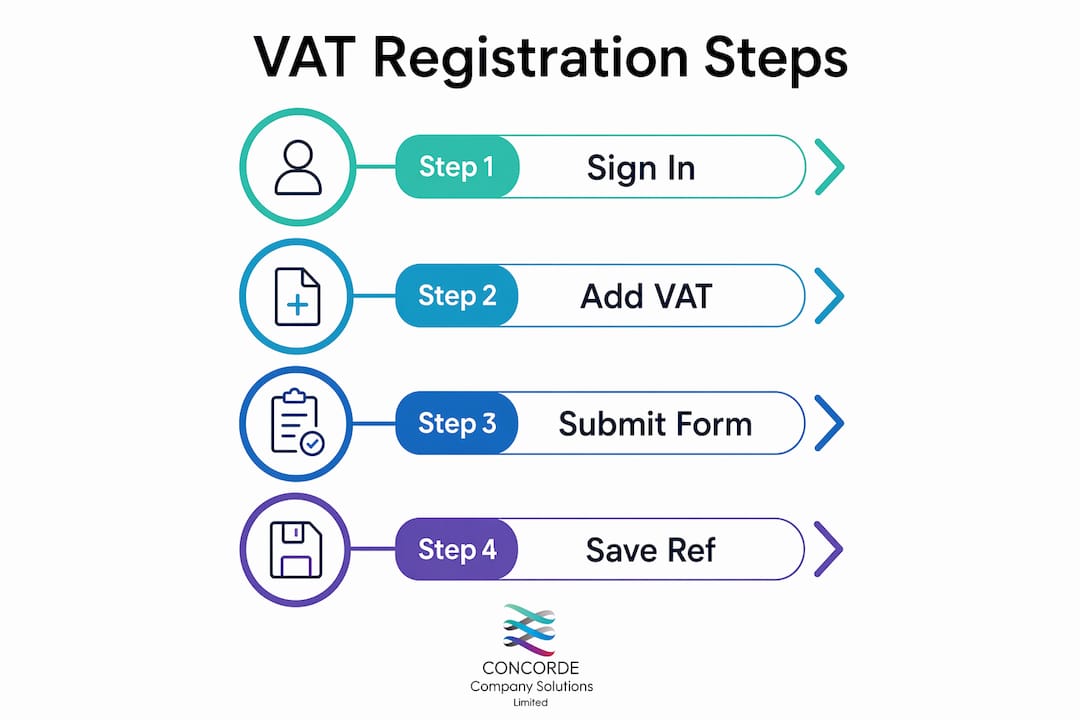
Step 3: Complete the registration form
The form asks for the following information:
- Business type (sole trader, partnership, limited company, etc.)
- UTR (Unique Taxpayer Reference) for sole traders and partnerships
- Company Registration Number (CRN) for limited companies
- National Insurance number for sole traders
- Business address and contact details
- Bank account details for VAT repayments
- Taxable turnover figures for the past 12 months and an estimate for the next 12
- Effective date of registration — the date from which you will charge VAT
- Details of the business activities and the VAT accounting scheme you intend to use
Step 4: Submit and save your reference number
Once submitted, HMRC issues a submission reference number. Keep it. HMRC will write to your registered address with your VAT registration certificate and 9-digit VAT number, usually within 30 working days. You can also check progress through your Government Gateway account.
Pro Tip: Have your Government Gateway credentials and UTR ready before you open the registration form. Creating them on the spot interrupts the session flow and increases the risk of errors or incomplete submissions — a point HMRC’s own guidance flags explicitly.
Who must register, and what are the threshold rules?
The VAT registration threshold in the UK is set at a specified level in taxable turnover. That figure applies on a rolling 12-month basis, not a tax year or calendar year. The distinction matters more than most people realise.
How taxable turnover works
Taxable turnover is the total value of everything you sell or supply that is not VAT-exempt. It includes standard-rated (20%), reduced-rated (5%), and zero-rated supplies. It does not include exempt supplies such as most financial services, insurance, or private education. VAT Notice 700/1 is the primary HMRC guidance for working out whether your supplies count.
Worked example: A Leeds-based sole trader providing IT consultancy has monthly earnings that eventually exceed the VAT registration threshold and must register within the required deadline after crossing it.
The two triggers for compulsory registration
| Trigger | Rule |
|---|---|
| Rolling 12-month taxable turnover exceeds the VAT threshold | Register within 30 days of the end of the month you went over |
| You expect to exceed the VAT threshold in the next 30 days alone | Register immediately — effective date is the start of that 30-day period |
Special cases that force registration regardless of turnover
- Overseas businesses making taxable supplies in the UK must register with no threshold.
- Businesses in Northern Ireland bringing goods in from the EU above £90,000 in acquisitions must register.
- Distance selling from Northern Ireland to EU consumers above £8,818 across the EU triggers registration in the relevant EU countries.
- Buying a VAT-registered business as a going concern may have implications for VAT registration obligations.
If you only sell VAT-exempt or out-of-scope goods, you generally do not need to register. The exception is large acquisitions from the EU into Northern Ireland, which can trigger registration even when all your supplies are otherwise exempt.
When voluntary registration makes sense
Voluntary registration is available to any business trading below the £90,000 threshold. The main commercial reason to register early is to reclaim input VAT on purchases. If you buy significant amounts of goods or equipment with VAT on them, registration can produce a net cash benefit. The trade-off: you must charge VAT on your sales, which makes your prices 20% higher to any customer who is not VAT-registered themselves. For B2B businesses selling mainly to other VAT-registered companies, this is rarely a problem. For consumer-facing businesses, it can dent competitiveness.
The UK’s £90,000 threshold is among the highest in the OECD, a deliberate policy choice to reduce compliance costs for microbusinesses. Crossing it creates a sharp jump in administrative obligations — which is precisely why preparation matters.
What documents and information do you need before you start?
Getting everything together before you open the GOV.UK form saves time and prevents the most common registration errors. Here is what each business type needs:
Sole traders
- National Insurance number
- UTR (found on your Self Assessment tax return or any HMRC correspondence)
- Government Gateway user ID and password
- Business name, address, and contact details
- Bank account details for VAT repayments
- Turnover figures for the past 12 months and an estimate for the next 12
- Details of your main business activity
Limited companies
- Company Registration Number (from Companies House)
- UTR for the company (on your Corporation Tax correspondence)
- Government Gateway credentials linked to the company
- Registered office address
- Bank account details
- Turnover figures and business activity description
How to get a UTR if you do not have one
For sole traders, a UTR is issued when you register for Self Assessment with HMRC. If you have not yet done so, register via GOV.UK and HMRC will post your UTR within 10 working days. For limited companies, the UTR is sent to the registered office address shortly after incorporation.
How to create Government Gateway credentials
Go to GOV.UK, select “Create sign in details”, and follow the identity verification steps. You will need a valid email address and either a passport, driving licence, or payslip for verification. Once created, add your business tax to the account before starting the VAT registration.
Pro Tip: Finalise your exact turnover figures and the date you exceeded (or expect to exceed) the threshold before you start the form. Entering an incorrect effective date is one of the most frequent registration errors and can result in HMRC issuing a backdated liability.
What happens after you register for VAT?
Registration is not the end of the process. It is the start of a set of ongoing obligations that run quarterly for most businesses.
What HMRC issues once you are registered
HMRC sends a VAT registration certificate to your principal place of business by post, confirming your VAT number, effective registration date, and VAT return filing dates. The certificate usually arrives after processing several weeks following your application. You can also view your VAT registration details through your Government Gateway account once the service has been added.
Adding VAT to your Government Gateway account
After registration, sign in to your business tax account and select “Add a tax, duty or scheme” to add the VAT service. This gives you access to submit VAT returns and make payments online.
Filing VAT returns and paying VAT
Most businesses file VAT returns quarterly, covering three-month accounting periods, and have a specified deadline to submit returns and payments after period end.
Records you must keep include:
- VAT account (a summary of VAT charged and reclaimed)
- Sales invoices showing VAT charged
- Purchase invoices showing input VAT reclaimed
- Import and export records where applicable
- Bank statements
Making Tax Digital for VAT
When you register for VAT, you are automatically enrolled in Making Tax Digital (MTD) unless you qualify for an exemption. MTD requires you to keep digital VAT records and submit returns using HMRC-compatible software. Xero, QuickBooks, Sage, and FreeAgent are all widely used MTD-compatible options. Plan for this before your first return is due — setting up software after registration is far easier than retrofitting it under deadline pressure. You can find a detailed walkthrough of the VAT return filing process on the Concorde Company Solutions Limited website.
What does VAT registration cost, and how does it affect cashflow?
There is no HMRC fee to register for VAT. The direct cost is zero. The real costs are indirect: accounting software, additional bookkeeping time, and potentially professional fees if you use an accountant to manage returns.
The cashflow reality
Once registered, you collect VAT from customers and pay it to HMRC quarterly. The timing creates a float — money that sits in your account between collection and payment. Managed well, this is a minor cashflow advantage. Managed poorly (spent before the quarter-end), it becomes a liability.
Worked example: A sole trader with £120,000 in annual taxable sales charges 20% VAT, collecting £24,000 in VAT per year from customers. They also spend £30,000 on supplies with £6,000 in input VAT. Their net VAT liability is £18,000 per year, paid in quarterly instalments of roughly £4,500. The £6,000 they reclaim reduces their effective costs — a genuine saving that would not exist if they were unregistered.
Advantages of registration
- Reclaim input VAT on business purchases, reducing effective costs.
- Appear more credible to B2B customers who expect a VAT number on invoices.
- Voluntary registration signals a trading business to suppliers and clients.
Disadvantages and risks
- Consumer-facing businesses must add 20% to prices, potentially losing price-sensitive customers.
- Quarterly filing deadlines add administrative workload.
- Late payment or filing attracts penalties and interest.
Simplified VAT schemes worth knowing
The Flat Rate Scheme lets eligible businesses pay a fixed percentage of gross turnover to HMRC rather than calculating actual input and output VAT. It reduces paperwork but is not always financially beneficial — the right answer depends on your actual purchase profile. GOV.UK offers a tool to estimate what registering for VAT may mean financially for your specific business before you commit. Use it. The Annual Accounting Scheme allows you to file one return per year with advance payments, which suits businesses with predictable turnover. Neither scheme should be selected without a cost-benefit comparison against your actual figures.
Common mistakes when registering and how to avoid penalties
Small errors at registration account for a disproportionate number of correction requests and penalty notices. The most frequent ones are avoidable with a little preparation.
The mistakes that cause the most problems
- Wrong effective date: Entering the date you submitted the form rather than the date you exceeded the threshold. HMRC will backdate your liability to the correct effective date, which can mean a surprise VAT bill for the period before you started charging.
- Inaccurate turnover calculation: Using tax-year figures instead of rolling 12-month figures, or omitting zero-rated sales from the calculation.
- Missing Government Gateway credentials: Starting the form without login details and having to create them mid-session, causing timeouts and incomplete submissions.
- Forgetting MTD obligations: Assuming you can file returns manually when MTD-compatible software is required from day one of registration.
- Registering too late: HMRC enforces a strict 30-day deadline after you exceed the threshold. Missing it means your effective date is backdated, and you may owe VAT on sales you made before you started charging it.
What HMRC does when you miss the deadline
HMRC can issue a penalty for late registration based on the VAT that was due from the correct effective date. The penalty is calculated as a percentage of the unpaid VAT and increases the longer the delay. Interest can also apply. If you realise you should have registered earlier, the right move is to register immediately and contact HMRC to explain the circumstances — voluntary disclosure typically results in a lower penalty than waiting for HMRC to discover the error.
Practical remedies if you have missed the deadline
- Register online without delay and use the correct backdated effective date.
- Calculate the VAT you should have charged from the effective date and prepare to pay it.
- Contact the HMRC VAT helpline to notify them proactively.
- Gather sales records for the missed period to support any HMRC enquiry.
- Consider professional support — an accountant can prepare the correction and negotiate with HMRC on your behalf.
For practical guidance on avoiding HMRC penalties, Concorde Company Solutions Limited publishes detailed compliance tips for UK small businesses.
How Concorde Company Solutions Limited helps with VAT registration and compliance
Concorde Company Solutions Limited is the number one accountancy firm in Garforth, Leeds for hands-on VAT registration and ongoing compliance support. The firm works with sole traders, limited companies, and small to medium-sized businesses across Garforth, Leeds, and Sherburn in Elmet — and its track record on VAT is built on getting the details right the first time.
The VAT services offered by Concorde Company Solutions Limited cover the full compliance cycle:
- VAT registration, including effective date calculation and scheme selection
- Quarterly VAT return preparation and filing
- Making Tax Digital setup and MTD-compatible software configuration
- Bookkeeping to support accurate input and output VAT records
- Payroll and PAYE management alongside VAT obligations
- HMRC correspondence and enquiry support
Where the firm adds the most value is at the point of registration itself. Choosing the wrong effective date, selecting an unsuitable VAT scheme, or miscalculating taxable turnover are the errors that create problems months later. Concorde Company Solutions Limited reviews your turnover figures, identifies the correct registration date, and advises on whether the Flat Rate Scheme or standard VAT accounting suits your business before anything is submitted to HMRC.
Pro Tip: If you are approaching the £90,000 threshold, speak to an accountant before you hit it — not after. The scheme you register under and the effective date you choose both have financial consequences that are much easier to get right at the start than to correct later.
Key takeaways
Registering for VAT correctly from the outset avoids backdated liabilities, penalties, and the administrative headache of correcting errors with HMRC.
| Point | Details |
|---|---|
| The registration threshold | You must register when taxable turnover exceeds £90,000 on a rolling 12-month basis. |
| The 30-day rule | HMRC enforces a strict 30-day deadline after you exceed the threshold; missing it triggers backdated liability. |
| MTD applies automatically | Every new VAT registrant is enrolled in Making Tax Digital and must use compatible software from day one. |
| Preparation prevents errors | Have your UTR, Government Gateway credentials, and accurate turnover figures ready before opening the GOV.UK form. |
| Concorde Company Solutions Limited | The firm handles VAT registration, returns, and MTD setup for businesses in Garforth, Leeds, and beyond. |
Why preparation is the part most people underestimate
There is a tendency to treat VAT registration as a form-filling exercise — something you do in a spare half-hour when the threshold looms. The reality is that the decisions made at the point of registration (effective date, scheme selection, turnover calculation) have consequences that run for years.
The businesses that end up with HMRC correction requests are rarely the ones who made complex errors. They are the ones who entered the wrong effective date because they were not sure which month they crossed the threshold, or who selected the Flat Rate Scheme because it sounded simpler without checking whether their purchase profile actually made it cheaper. These are not difficult things to get right. They just require a few minutes of preparation and, ideally, a conversation with someone who has done it hundreds of times.
At Concorde Company Solutions Limited, the advice given to every client approaching the threshold is the same: calculate your rolling 12-month turnover before you open the form, not during it. Know your UTR. Know your Government Gateway login. And if you are unsure about scheme selection, ask before you submit — because changing a VAT scheme after registration involves a separate application and a waiting period.
VAT registration is not complicated. But it rewards the people who treat it seriously.
VAT registration and compliance, handled for you
Concorde Company Solutions Limited takes the guesswork out of VAT for small businesses and sole traders across Garforth, Leeds, and the surrounding areas. Rather than navigating the GOV.UK registration flow alone and hoping the figures are right, you get a firm that calculates your correct effective date, selects the right VAT scheme for your business, and sets up your MTD-compatible software before your first return is due.

Fixed, transparent pricing means you know exactly what the service costs before you commit. Whether you need a one-off registration handled correctly or ongoing quarterly VAT returns as part of a full bookkeeping package, Concorde Company Solutions Limited has a service that fits. The firm’s VAT registration and compliance services are available now. Get in touch for a registration quote and find out why businesses in Garforth and Leeds consistently rate Concorde Company Solutions Limited as their first call for VAT support.
Useful sources
The following authoritative sources are recommended for verifying VAT registration rules and requirements. HMRC and GOV.UK are the legal authorities — always confirm current thresholds and deadlines directly with them.
- When to register for VAT — GOV.UK: The primary HMRC page covering registration thresholds, timing rules, and the online registration service.
- VAT Notice 700/1: Who should register for VAT — GOV.UK: The detailed HMRC rulebook for taxable turnover tests and borderline cases.
- How VAT works: VAT thresholds — GOV.UK: A clear summary of the current registration and deregistration thresholds.
- Check what registering for VAT may mean for your business — GOV.UK: HMRC’s own financial estimation tool for businesses considering registration.
- Register for VAT by post — GOV.UK: Guidance on when and how to use form VAT1 for postal registration exceptions.
- Concorde Company Solutions Limited — VAT services: Local VAT registration, returns, and compliance support for businesses in Garforth, Leeds, and Sherburn in Elmet.
This article is general information, not professional advice. VAT rules can change, and your specific circumstances may affect what applies to you. Confirm the current rules with HMRC or a qualified accountant before registering.
No responses yet