
TL;DR:
- Getting VAT returns right is crucial for small businesses to avoid penalties and ensure compliance.
- Proper registration, accurate record-keeping, and using Making Tax Digital software are essential steps in the process.
- Careful calculations of output and input VAT, timely submissions, and avoiding common mistakes safeguard businesses from penalties.
Getting your VAT returns right matters more than most small business owners realise until they get it wrong. Whether you are a sole trader approaching the £90,000 registration threshold for the first time or an established limited company preparing your quarterly submission, the VAT filing process has enough moving parts to catch even careful operators out. This guide walks you through vat returns step by step, covering registration, calculations, online submission, and the most common mistakes that lead to HMRC penalties.
Table of Contents
- Key takeaways
- Before you file: registration and record keeping
- Calculating output VAT and input VAT
- Submitting your VAT return online
- Common VAT return mistakes and how to avoid them
- My experience with VAT returns for small businesses
- How Concordecompanysolutions can help
- FAQ
Key takeaways
| Point | Details |
|---|---|
| Know the threshold | You must register for VAT once taxable turnover exceeds £90,000 in a rolling 12-month period. |
| Separate your VAT correctly | Distinguish clearly between output VAT (charged on sales) and input VAT (paid on purchases) before completing any return. |
| Digital filing is mandatory | Most VAT-registered businesses must file using Making Tax Digital compatible software, not paper forms. |
| Mind the deadline | VAT returns and payments are due one month and seven days after the end of each VAT period. |
| Avoid common errors | Double-check zero-rated, exempt, and taxable sales to prevent costly mistakes and HMRC penalties. |
Before you file: registration and record keeping
Before you can begin the VAT returns step by step process, you need to confirm you are registered and your records are in order. This groundwork prevents filing errors before they have a chance to happen.
When to register for VAT
You must register for VAT if your taxable turnover exceeds £90,000 within any rolling 12-month window. That means you are not looking at the tax year or calendar year. You are checking the last 12 months on a rolling basis, every month.
One widely misunderstood point: taxable turnover excludes exempt supplies. If part of your business income is exempt (such as insurance or certain education services), those figures should not count towards your registration threshold. Many business owners receive a letter from HMRC and assume they must register immediately, without verifying whether their exempt income has inflated the apparent total. Always check the composition of your turnover first.
Once registered, HMRC issues your VAT registration number. You cannot legally charge VAT on sales until you have this number. Do not issue VAT invoices before registration is confirmed.
Records you need before filing
Keeping clean records is the difference between a straightforward return and a stressful correction exercise. Before you prepare any VAT return, gather the following:
- Sales invoices showing VAT charged to customers (output VAT)
- Purchase invoices and receipts showing VAT paid to suppliers (input VAT)
- Bank statements to cross-reference payments and receipts
- Import and export records if your business trades internationally
- A clear split between zero-rated, standard-rated, and exempt transactions
Making Tax Digital compliance
VAT returns must be filed using Making Tax Digital compatible software unless your business qualifies for a specific exemption. This matters because HMRC no longer accepts manual submissions for most businesses. Software options range from full accountancy packages to bridging software that connects a spreadsheet to HMRC’s systems. If you have not yet set up compliant software, the Concordecompanysolutions article on digital tax submission is worth reading before you proceed.
Pro Tip: Set up your software to automatically categorise transactions as standard-rated, zero-rated, or exempt. This saves significant time at quarter-end and reduces manual entry errors.
Calculating output VAT and input VAT
This is where understanding VAT returns really counts. The numbers you enter on your return must reflect accurate calculations, not estimates.
What is output VAT?
Output VAT is the VAT you charge your customers on taxable sales. If you sell a product for £1,200 including VAT at 20%, the output VAT is £200 and the net sale is £1,000.
The standard VAT rate in the UK is 20%. Some goods and services attract the reduced rate of 5% (for example, domestic energy or children’s car seats), and others are zero-rated (such as most food and children’s clothing). Zero-rated sales are still taxable supplies and count towards your registration threshold, even though no VAT is actually charged. This is one of the distinctions that trips up new registrants.
What is input VAT?
Input VAT is the VAT you pay when purchasing goods or services for your business. If you buy £600 of stock inclusive of 20% VAT, you have paid £100 in input VAT. You can reclaim this on your VAT return, reducing the amount you owe HMRC.
You can only reclaim input VAT on purchases made wholly or partly for business purposes. Personal expenses do not qualify. Mixed-use purchases, such as a phone used for both personal and business calls, require you to apportion the input VAT claim accordingly.
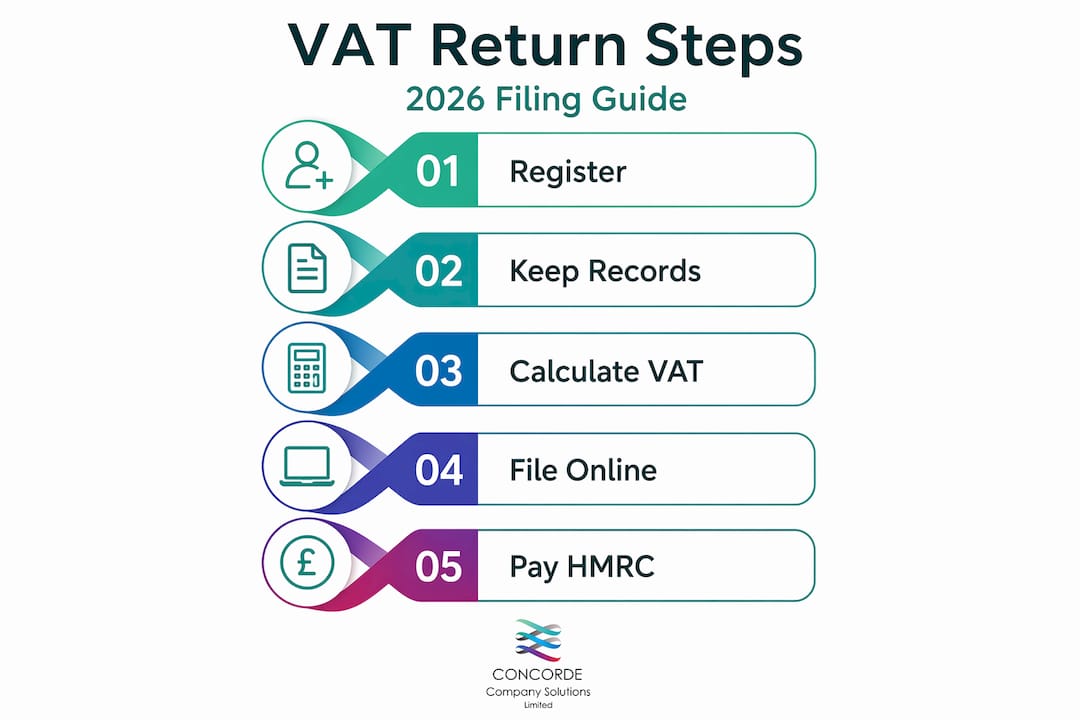
Steps to complete your VAT return calculations
A VAT return requires details of your total sales, purchases, VAT charged, and VAT reclaimed. Here is the process:
- Total your gross sales for the VAT period, including all VAT-inclusive amounts.
- Extract the output VAT from your sales figures. For 20% VAT: divide the gross by 1.2 and subtract the result from the gross.
- Total your gross purchases including all VAT paid on business expenses.
- Extract the input VAT from your purchase figures using the same calculation method.
- Subtract input VAT from output VAT. The result is your net VAT payable. If the result is negative, you have a repayment claim.
- Check your figures match the totals in your accounting software before you submit.
Here is a simple worked example:
| Description | Amount |
|---|---|
| Total sales (VAT-inclusive) | £24,000 |
| Output VAT (20%) | £4,000 |
| Total purchases (VAT-inclusive) | £9,600 |
| Input VAT (20%) | £1,600 |
| Net VAT payable to HMRC | £2,400 |
Pro Tip: Never round VAT figures as you go. Work in pence throughout your calculation, then round only the final figure on the return form. Rounding mid-calculation creates small discrepancies that accumulate into larger errors over time.
Submitting your VAT return online
Once your figures are calculated and verified, the filing itself is relatively straightforward. But there are details to get right.
Signing in and entering your figures
Log into your HMRC business tax account and navigate to your VAT return. If you use Making Tax Digital software, the return is submitted directly through the software’s API connection to HMRC, meaning you do not need to re-enter figures manually. This reduces transcription errors and is generally the cleaner approach.
The VAT return contains nine boxes. The most important are:
- Box 1: Total output VAT (VAT charged on sales)
- Box 4: Total input VAT (VAT reclaimed on purchases)
- Box 5: Net VAT payable or reclaimable (Box 1 minus Box 4)
- Box 6: Total value of sales, excluding VAT
- Box 7: Total value of purchases, excluding VAT
Boxes 2, 3, 8, and 9 apply to EU acquisitions and despatches, relevant if your business trades across borders.
Deadlines and payments
VAT returns and payments are due one month and seven days after the end of your VAT period. For a period ending 31 March, that means your return and payment must reach HMRC by 7 May. Mark this in your calendar at the start of every quarter. Missing the date by even one day triggers the penalty process.
If you are owed a repayment, HMRC typically processes this within 10 working days to your nominated bank account. Repayments are not automatic if you have outstanding debt with HMRC, so clear any arrears first.
Payment methods accepted by HMRC include Direct Debit, BACS transfer, faster payments, and CHAPS. Do not pay by cheque unless you have no other option, as postal delays can push you past the deadline.
Before you hit submit
Run through this checklist before confirming your return:
- All invoices for the period have been entered
- Output VAT and input VAT figures match your software totals
- You have not included exempt supplies in your taxable figures
- The VAT period dates on the form are correct
- You have set up or confirmed your payment method
Common VAT return mistakes and how to avoid them
Errors in VAT returns lead to incorrect payments, potential repayment delays, and in serious cases, penalties from HMRC. Most errors are avoidable with a consistent process.
The most frequent mistakes include:
- Registering late after exceeding the £90,000 threshold, often because rolling turnover was not monitored monthly
- Mixing exempt and taxable supplies when calculating output VAT, which inflates or deflates your figures
- Claiming input VAT on non-business expenses, including entertaining customers (which is specifically blocked)
- Posting invoices in the wrong period, particularly around quarter-end when invoices arrive late
- Submitting the return without paying, assuming the filing alone satisfies HMRC
HMRC can impose penalties of up to twice the VAT owed in cases of non-registration or persistent late filing. The new penalty points system also means repeated late submissions accumulate points that eventually trigger fixed financial penalties, regardless of the amount owed.
The best protection is a monthly bookkeeping routine. Reconcile your bank account to your accounting software every month. Categorise every transaction correctly at the time of entry, not in a rush at quarter-end. If you are unsure whether something qualifies as a claimable expense, speak to an accountant before claiming it rather than after HMRC queries it. For a fuller look at where small businesses go wrong, the guide on common accounting mistakes covers the broader picture beyond VAT.
My experience with VAT returns for small businesses
I have worked with small business owners and sole traders through enough VAT return cycles to know where the stress actually comes from. It is rarely the maths. It is the disorganisation that builds up over the quarter and then lands as a crisis in the final week before the deadline.
The business owners who handle VAT returns calmly share one habit: they do not leave record reconciliation until the end of the period. They treat it as a monthly task that takes an hour, not a quarterly ordeal that takes a weekend. That shift alone removes the majority of the pressure.
What I have also found is that people underestimate how much the registration rules matter for what you can and cannot claim. I have seen clients claim input VAT on a laptop bought before they registered, or miss the fact that their gym membership slipped through in the expenses. These are honest mistakes, but they create corrections, and corrections create audit trails.
My genuine advice: use Making Tax Digital software from day one, but read the return yourself before submitting. Understand what is in each box. Software is only as accurate as the data you put into it. A professional can catch the errors, but you will catch far more of them yourself if you understand the VAT filing process. The goal is not to become an expert accountant. It is to know enough that nothing surprises you.
— David
How Concordecompanysolutions can help
If you have read this far and feel confident about the process, that is exactly what this guide was designed to achieve. But confidence and time are two different things, and many small business owners simply do not have the hours to manage VAT preparation alongside running their business.

Concordecompanysolutions works with small businesses and sole traders across Yorkshire to prepare and file VAT returns accurately and on time. The team also manages payroll for small businesses, handling PAYE and employee tax obligations so nothing falls through the gaps. Whether you need full VAT management or a second pair of eyes before submission, Concordecompanysolutions offers transparent, fixed-fee support tailored to the size and complexity of your business. Get in touch to find out how the team can take compliance off your plate.
FAQ
What is the VAT registration threshold in 2026?
The VAT registration threshold is £90,000 in taxable turnover within a rolling 12-month period. Exempt supplies do not count towards this figure.
How do I file a VAT return in the UK?
You must file using Making Tax Digital compatible software or through HMRC’s online VAT account. Paper submissions are no longer accepted for most businesses.
When is my VAT return due?
Your VAT return and payment are both due one month and seven days after the end of your VAT period. For a period ending 31 March, the deadline is 7 May.
How long does a VAT refund take?
HMRC typically processes VAT repayments within 10 working days to your nominated bank account, provided there are no outstanding debts or queries on your account.
What happens if I make a mistake on my VAT return?
Minor errors below the adjustment threshold can be corrected on your next return. Larger errors must be reported to HMRC separately. Persistent inaccuracies can result in penalties, so double-checking figures before submission is always worth the extra time.
No responses yet